
MODULE 21 / 33
KurumsalPortal Support: Contextual Requests to the YazSis Team from Inside the Portal
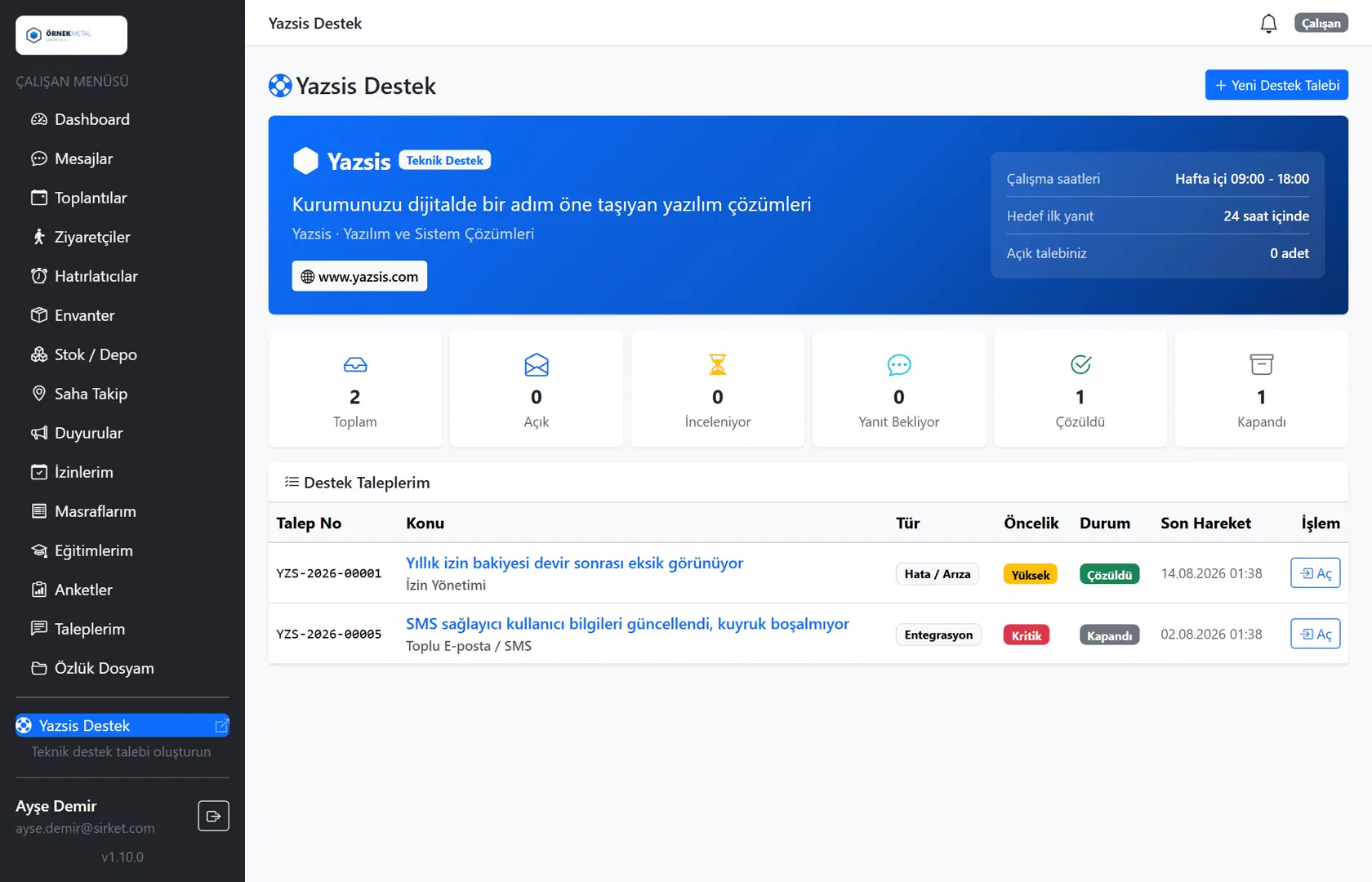
Reach support from inside the portal, with the right context.KurumsalPortal support is the channel that lets portal users send support requests straight to the YazSis team from inside the portal. The YazSis Support module in YazSis KurumsalPortal sends each request with screen, browser and file context, and responses and resolution history stay in the same record, so there is no long back-and-forth to describe the problem.
WHO IS IT FOR?portal usersSystem administratorsYazSis support team
YAZSIS / KURUMSALPORTAL
Sales & Support
BUSINESS OUTCOMEDo more than keep records.
Do more than keep records.
Manage the process.
KurumsalPortal places every module into real operations through permissions, notifications, approvals, reporting and integrations.
CORE CAPABILITIES
Bring control into the system with YazSis Support.
Every step is traceable with its owner, time, status and activity history.
Quick support requests from the portal
Users turn a problem into a support request without leaving the portal, and the request goes straight to the YazSis support team.
Files, images and technical context
Screenshots, files and browser details are added to the request, so the support team reviews the problem in its technical context without asking again.
Response history and resolution report
Responses and resolution steps collect in the request record; the request closes once the user confirms the solution, and past resolutions can be reported.
HOW DOES IT WORK?
Register, track and deliver results in five steps.
Workflows adapt to your organization’s approval, role and notification rules.
CONNECTED, NOT ISOLATED
Data flow with other systems: let’s define the scope together.
KurumsalPortal works on its own. If you need data flow with your ERP, time-attendance, accounting or other systems, we define which data moves and how during the needs analysis.
Explore Our Integration CapabilitiesERPPDKSAPIYazSis SupportEMAILSMSREPORT
FREQUENTLY ASKED QUESTIONS
KurumsalPortal support: frequently asked questions
How do we open a support request with YazSis?
A YazSis KurumsalPortal user opens a request in the YazSis Support module without leaving the portal, describes the problem and adds the context needed. The request goes straight to the YazSis team, and the response and resolution are followed in the same record.
Where can we follow the status of a support request?
In the YazSis Support module of YazSis KurumsalPortal, the responses and resolution steps of every request appear in its record. Users and the system administrator follow the request's stage in the portal and close it by confirming once the solution arrives.
Can we attach a screenshot to a support request?
Yes. In the YazSis Support module of YazSis KurumsalPortal, you can attach files and images to a request, and screen and browser details are included as well. This technical context helps the YazSis team understand and solve the problem faster.
NEXT STEP
Request a Demo