
MODULE 10 / 33
Field Employee Tracking Software: Weekly Plans, Location Checks and Visit Proof
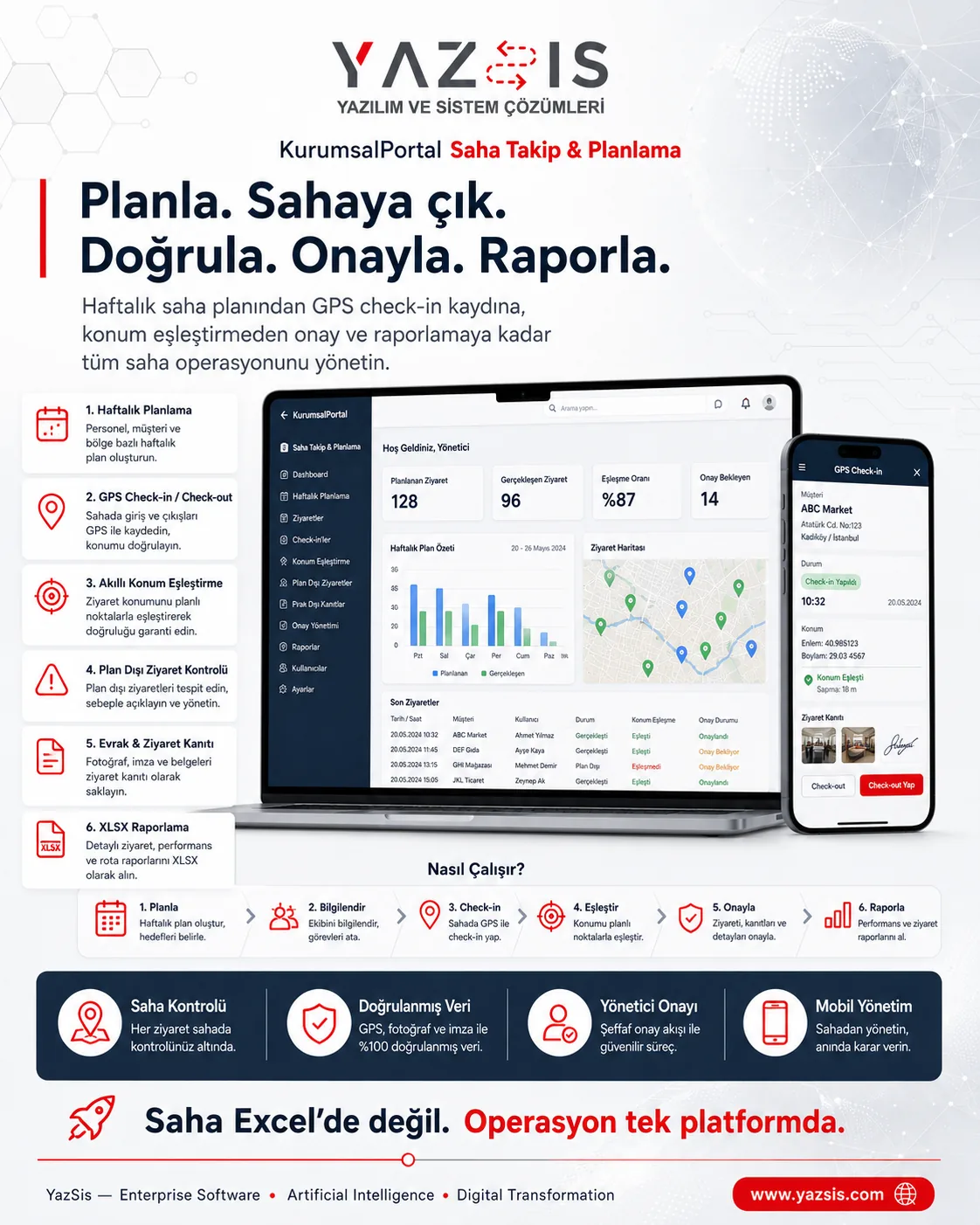
Match the field plan with real activity and proof.Field employee tracking software plans field team visits and records each visit with location and proof. YazSis KurumsalPortal's Field Tracking & Planning module runs the process from weekly plan to field visit, saving a location match and proof when a user starts an action in the phone's browser. Location is not tracked continuously; an XLSX report shows plan versus actual.
WHO IS IT FOR?Field teamsRegional managersOperations
YAZSIS / KURUMSALPORTAL
Operations & Field
BUSINESS OUTCOMEDo more than keep records.
Do more than keep records.
Manage the process.
KurumsalPortal places every module into real operations through permissions, notifications, approvals, reporting and integrations.
CORE CAPABILITIES
Bring control into the system with Field Tracking & Planning.
Every step is traceable with its owner, time, status and activity history.
Weekly visit plan
Visits are set up as a weekly plan and assigned to team members as tasks, so regional managers see in advance who goes where.
Action-based location check
Location is captured when a user starts an action in the phone's browser and matched to the planned visit; there is no continuous tracking.
Proof, notes and XLSX report
Employees add proof and notes to each visit, and plan-versus-actual gaps and off-plan movements are exported in an XLSX report.
HOW DOES IT WORK?
Register, track and deliver results in five steps.
Workflows adapt to your organization’s approval, role and notification rules.
CONNECTED, NOT ISOLATED
Data flow with other systems: let’s define the scope together.
KurumsalPortal works on its own. If you need data flow with your ERP, time-attendance, accounting or other systems, we define which data moves and how during the needs analysis.
Explore Our Integration CapabilitiesERPPDKSAPIField Tracking & PlanningEMAILSMSREPORT
WHERE IS THE DATA KEPT?
Your own server, role-based permissions.
Field Tracking & Planning runs on the shared KurumsalPortal infrastructure: your data is kept on your own server, and employees use it from their phone's browser without installing an app.
See the installation and data modelFREQUENTLY ASKED QUESTIONS
Field employee tracking software: frequently asked questions
Is the location of field staff tracked all the time?
No. In YazSis KurumsalPortal's Field Tracking & Planning module, location is captured only when a user starts an action in the field, such as checking in at a visit, and is matched to the planned visit. This action-based approach focuses on verifying that visits took place without continuous location tracking.
How do field employees add proof of a visit?
In YazSis KurumsalPortal's Field Tracking & Planning module, field employees check in at the visit location from their phone's browser and add proof and a note, with no app to install. Proof is stored in the visit record with the location match and is visible to the regional manager.
How is the gap between plan and actual reported?
In YazSis KurumsalPortal's Field Tracking & Planning module, visits in the weekly plan are compared with check-ins and location matches in the field. Visits that were planned but not made, and visits made outside the plan, appear in the report, which you can export as XLSX.
NEXT STEP
Request a Demo