
MODULE 01 / 33
KPI Dashboard Software: Role-Based KPIs and a Notification Center
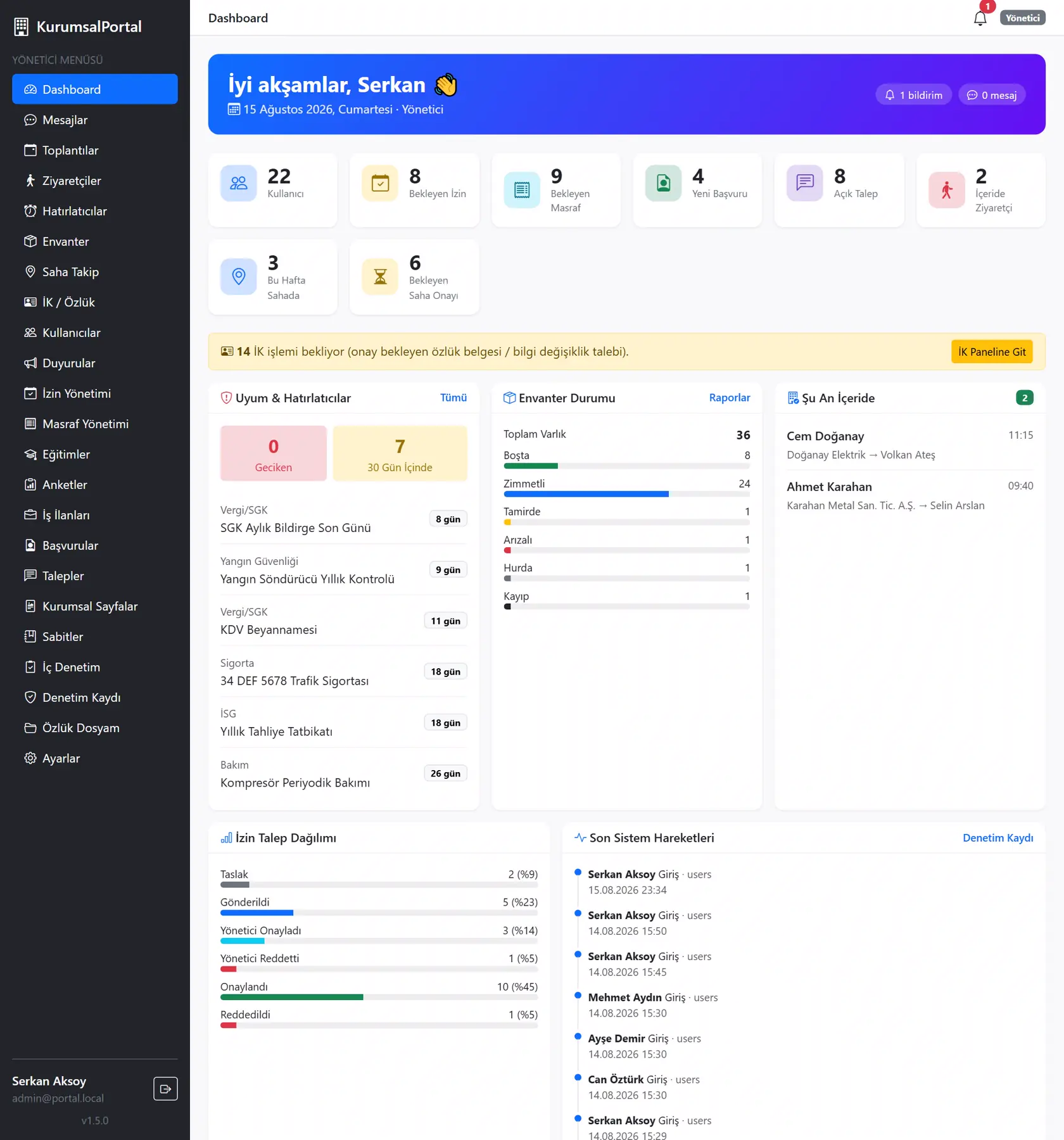
Your company's daily pulse on one screen.KPI dashboard software gives each user a role-based screen that brings KPIs, pending tasks and notifications together in one place. The Dashboard Management module of YazSis KurumsalPortal publishes personal dashboards showing employees, unit managers and senior management only the data relevant to them. Upcoming tasks collect in the notification center, deviations stand out at a glance and manual reporting decreases.
WHO IS IT FOR?Senior managementUnit managersEmployees
YAZSIS / KURUMSALPORTAL
Management & Infrastructure
BUSINESS OUTCOMEDo more than keep records.
Do more than keep records.
Manage the process.
KurumsalPortal places every module into real operations through permissions, notifications, approvals, reporting and integrations.
CORE CAPABILITIES
Bring control into the system with Dashboard Management.
Every step is traceable with its owner, time, status and activity history.
Live role-based KPI view
Each user tracks the KPIs defined for their role live, and senior managers, unit managers and employees see only data within their permission scope.
Upcoming tasks and notification center
Pending and upcoming tasks sit alongside notification center alerts on the same screen, so each user sees at once what is waiting for them.
Performance and process shortcuts
Performance indicators and process shortcuts sit on the dashboard, so users go from a deviation to the related process and turn decisions into action.
HOW DOES IT WORK?
Register, track and deliver results in five steps.
Workflows adapt to your organization’s approval, role and notification rules.
CONNECTED, NOT ISOLATED
Data flow with other systems: let’s define the scope together.
KurumsalPortal works on its own. If you need data flow with your ERP, time-attendance, accounting or other systems, we define which data moves and how during the needs analysis.
Explore Our Integration CapabilitiesERPPDKSAPIDashboard ManagementEMAILSMSREPORT
WHERE IS THE DATA KEPT?
Your own server, role-based permissions.
Dashboard Management runs on the shared KurumsalPortal infrastructure: your data is kept on your own server, and employees use it from their phone's browser without installing an app.
See the installation and data modelFREQUENTLY ASKED QUESTIONS
KPI dashboard software: frequently asked questions
What data appears on the KPI dashboard?
In the Dashboard Management module of YazSis KurumsalPortal, the KPIs defined for each role, pending and upcoming tasks, notifications, and performance and process shortcuts appear on one screen. Which indicators go on a dashboard is decided when the roles and KPIs are defined.
Does every manager see the same dashboard?
No. Dashboards in the Dashboard Management module of YazSis KurumsalPortal are role-based: senior management, unit managers and employees see the KPIs and tasks defined for their own role. Each user accesses only the data they are authorized to see, so dashboards stay focused and data scope follows permissions.
Can we bring ERP data into the dashboard?
The Dashboard Management module of YazSis KurumsalPortal feeds dashboards from defined data sources. Bringing data from another system, such as your ERP, onto a dashboard is possible as a separate data exchange project. Which data is transferred, and the scope of that work, are defined together in the project.
NEXT STEP
Request a Demo