
MODULE 02 / 33
Internal Messaging Software: Work Conversations on Record, on One Platform
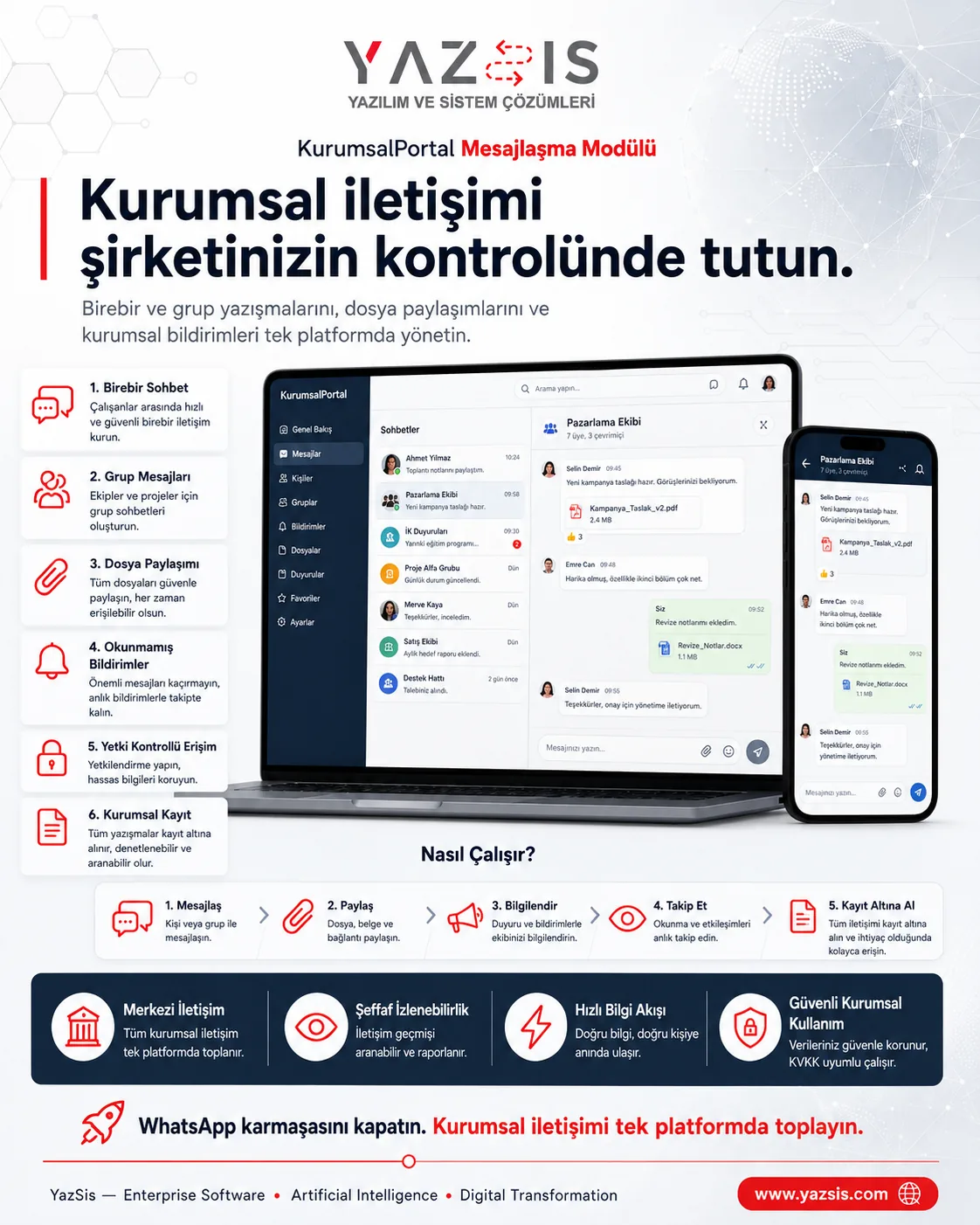
Keep internal communication in one place and on record.Internal messaging software keeps employees' one-to-one and group conversations, along with the files and images they share, on record in a single company channel. YazSis KurumsalPortal's Messaging Module brings team chats and work files together in a portal that runs on your own server. You end up with fewer scattered channels, and company knowledge is preserved.
WHO IS IT FOR?All employeesProject teamsManagers
YAZSIS / KURUMSALPORTAL
Communication & Engagement
BUSINESS OUTCOMEDo more than keep records.
Do more than keep records.
Manage the process.
KurumsalPortal places every module into real operations through permissions, notifications, approvals, reporting and integrations.
CORE CAPABILITIES
Bring control into the system with Messaging Module.
Every step is traceable with its owner, time, status and activity history.
One-to-one and group conversations
Employees pick a person or team to start a one-to-one or group chat, and project teams and managers coordinate each topic in one channel.
File and image sharing
Work files and images are shared inside the conversation and stay on record with it, so nobody searches scattered channels for a file.
Unread messages and access control
Users see unread messages at a glance and get notifications for new messages, while only authorized people can access each conversation.
HOW DOES IT WORK?
Register, track and deliver results in five steps.
Workflows adapt to your organization’s approval, role and notification rules.
CONNECTED, NOT ISOLATED
Data flow with other systems: let’s define the scope together.
KurumsalPortal works on its own. If you need data flow with your ERP, time-attendance, accounting or other systems, we define which data moves and how during the needs analysis.
Explore Our Integration CapabilitiesERPPDKSAPIMessaging ModuleEMAILSMSREPORT
WHERE IS THE DATA KEPT?
Your own server, role-based permissions.
Messaging Module runs on the shared KurumsalPortal infrastructure: your data is kept on your own server, and employees use it from their phone's browser without installing an app.
See the installation and data modelFREQUENTLY ASKED QUESTIONS
Internal messaging software: frequently asked questions
How is internal messaging software different from personal messaging apps?
In personal apps, work conversations end up scattered across employees' private accounts. YazSis KurumsalPortal's Messaging Module keeps one-to-one and group conversations, with their shared files, in a portal that runs on your own server. Access follows company permissions, and conversations remain part of company records.
Are chat conversations kept as company records?
Yes. In YazSis KurumsalPortal's Messaging Module, one-to-one and group conversations and the files shared in them stay on record inside the portal. Work conversations remain in company records even when employees or teams change, and permission settings limit who can access those records.
Can files be shared in group chats?
Yes. YazSis KurumsalPortal's Messaging Module lets users share files and images in one-to-one conversations and in team groups. Shared content stays in that conversation's record, is visible to the people who have access to the conversation, and new content triggers a notification.
NEXT STEP
Request a Demo